
Field manual · Optional
Hosting
Hosting is for people who want to run servers of their own. It is free and optional: to play, you never need it.
Just want to play?
You do not need anything on this page. Press Quick Play, or see Play online.
Two ways to host
Custom Match
For an evening with friends. Your game hosts a match on your PC while you play in it, online or on your LAN, with an optional password. No extra download.
Dedicated servers
For communities. The server package runs any number of servers on a Windows PC, with no window and no graphics card needed, around the clock. They are listed for everyone under Community.
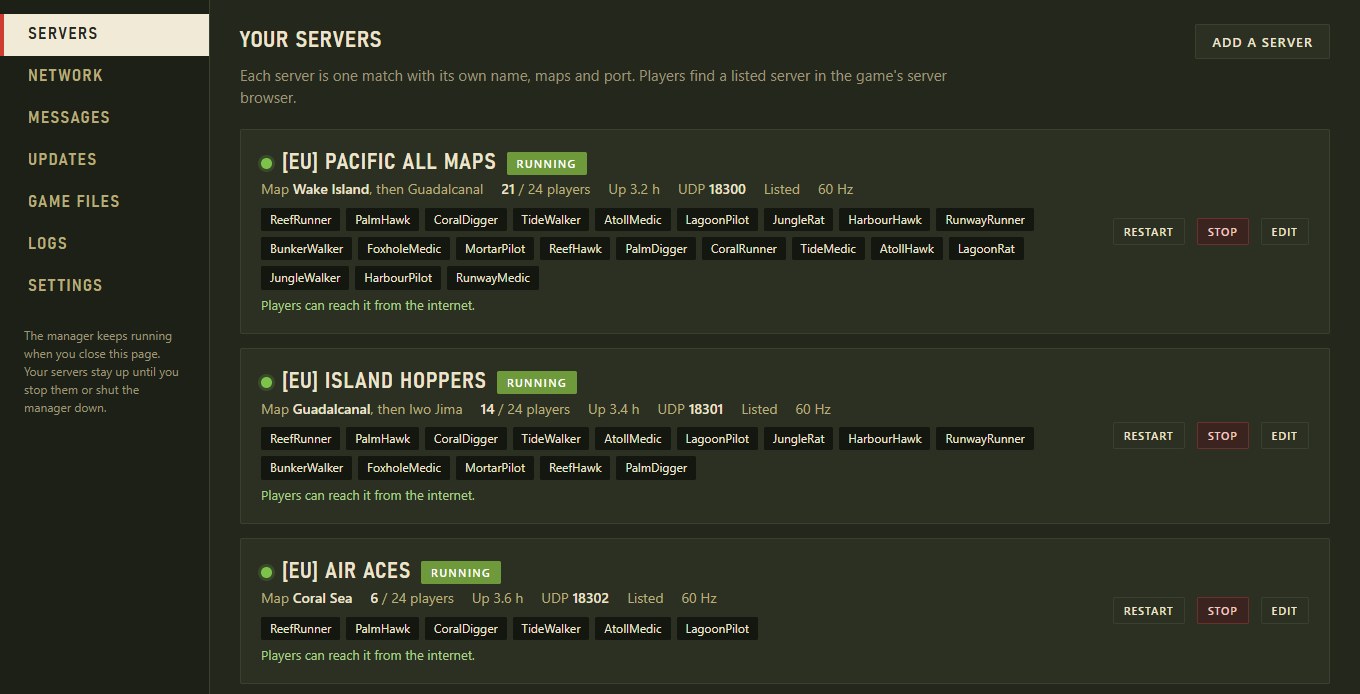
What the server package includes
- The server: the game itself running as a dedicated server, playing your maps in turn. When a round ends the next map loads, and the players stay.
- Its host: links the players to the server, keeps it listed and passes on voice and text chat.
- The server manager: installs the game from your package, runs your servers, sends messages and installs updates.
What you need
- Windows 10, 11 or Windows Server, 64 bit. The package brings its own Python.
- Your own copy of the game for Xbox 360, installed once.
- UDP ports you can open: 18300 for the first server, 18301 for the next, and on.
Hosting guides
Guide 5.1Host a serverInstall the server package and start your first servers.Guide 5.2Ports and firewallsLet players reach your servers from the internet.Guide 5.3Running your serverMessages, updates and day to day care.
Rules for listed servers
Community servers set their own rules and are run by their owners. A server must follow our terms to stay listed, and the project may remove any server from the list.